Private beta · by invitation
Invoicing with every koruna accounted for.
Invoices with a QR payment code, bank payments matched to your documents and a clear view of who owes you. A Czech invoicing app for sole traders and small companies, on desktop and on your phone.
Invitation only · no ads, no tracking


- QR payment on invoices
- ISDOC 6.0.2
- ČNB and ECB rates
- ARES and VIES
- POHODA XML
- Five languages
Features
Everything invoicing needs.
From a quotation to a paid invoice. Amounts and VAT are calculated on the server to the exact haléř, and an issued document is never rewritten.
-
Eight document types
Turn a quotation into an order, the order into a delivery note and an invoice. Paid advances are deducted in the final invoice together with their VAT.
- Invoice
- Proforma invoice
- Tax document for a payment
- Cash receipt
- Credit note
- Quotation
- Order
- Delivery note
Czech VAT rules
For VAT payers and non-payers. Tax point date, a summary per rate and rounding that follows how your customers pay.
Foreign currencies
Invoicing in euros or another currency? The ČNB or ECB rate for the document date is looked up and the CZK conversion is printed on the invoice.
Customers from ARES
Enter a company ID and the address is filled in from ARES. Check a VAT ID in VIES and keep the result with the contact.
Recurring invoices and reminders
Recurring invoices are issued on schedule, reminders go out in three stages and customers receive a payment confirmation.
Your own document design
Adjust the invoice layout in a visual editor: logo, colours, blocks and footer. Every template change is kept in its history.
Teams and several companies
Invite colleagues as editors or read-only viewers. Run several companies under one account with a shared address book.
Five languages
Interface and documents in Czech, Slovak, English, German and Polish. Light and dark mode.
Invoice and PDF
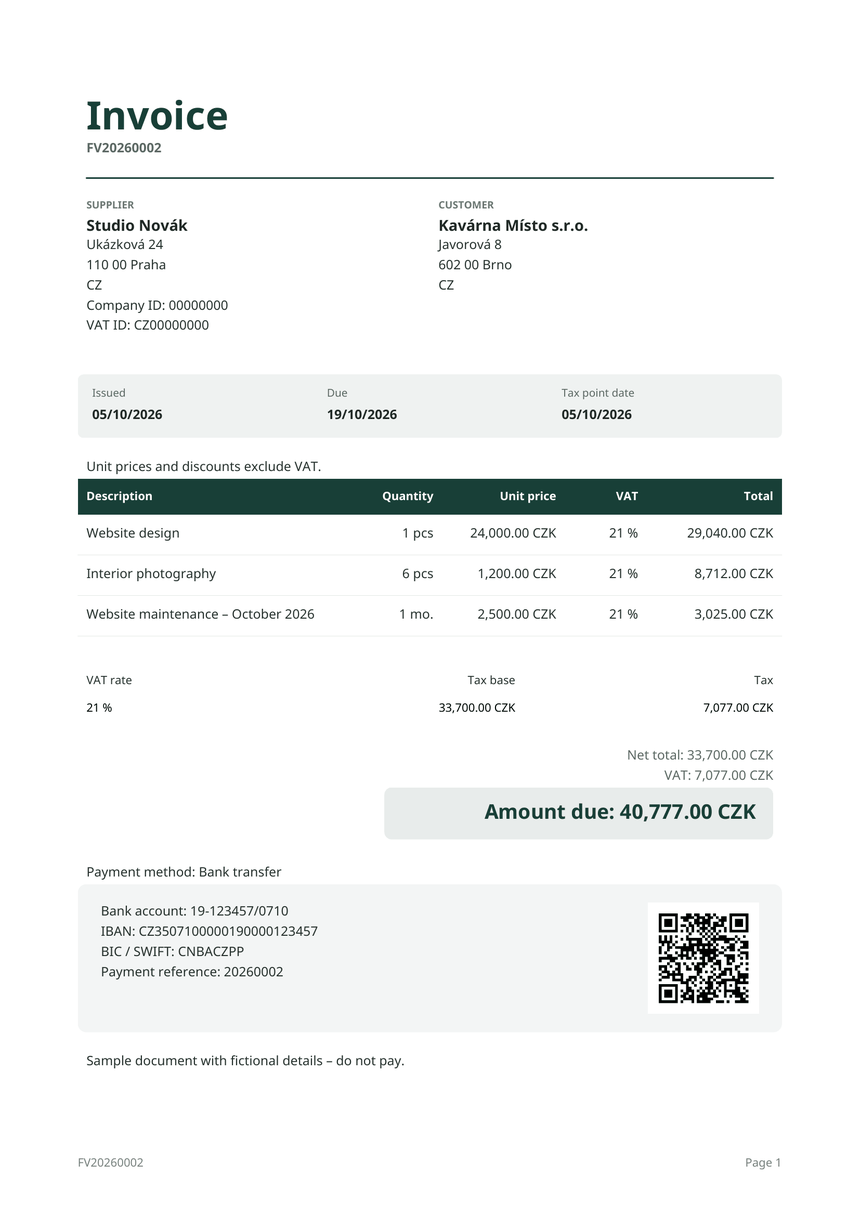
An invoice your customer pays with a single scan.
An invoice in Czech koruna paid by bank transfer carries a QR code following the Czech Banking Association standard. Banking apps read the account, the amount and the payment reference from it.
QR payment
Account, amount and payment reference in one code that Czech banking apps can read.
VAT summary
Tax base and tax per rate, the tax point date and rounding according to your settings.
Payment details
Account number, IBAN and BIC from the company’s bank accounts. You can print further accounts too.
- ISDOC 6.0.2 embedded in the PDF and downloadable on its own, for documents in Czech koruna
- Issued documents are never rewritten; corrections are made with a credit note
- Your own number series for every document type
- A PDF link for your customer that you can revoke at any time
Bank and payments
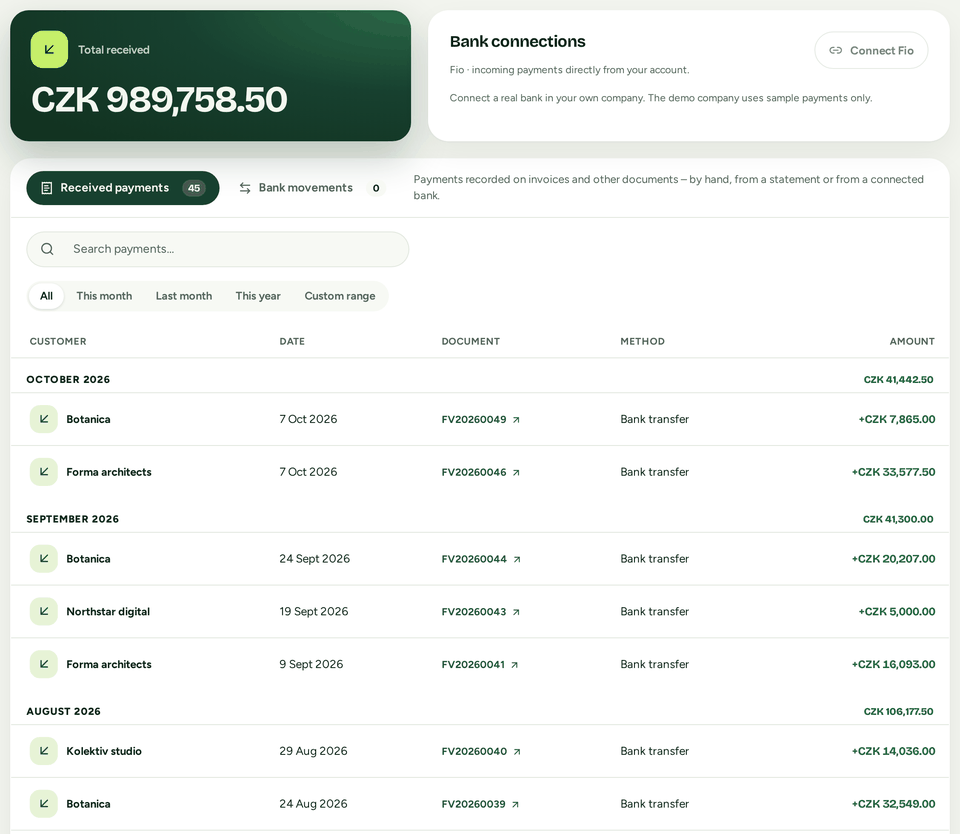
Payments are matched to invoices by payment reference.
Connect a Fio bank account or upload a statement. When the account, currency, payment reference and amount all match, the payment is allocated automatically. The rest takes a few clicks.
Fio bank
Connected with a read-only token. Transactions are downloaded regularly and nothing is ever sent from the account.
CSV import
Upload payments from other banks as a CSV file in a simple format.
Partial payments and overpayments
Split one payment across several invoices; an overpayment stays visible.
Refunds and corrections
Record an outgoing payment as a refund of an invoice overpayment, or undo a payment matched by mistake.
Overview and reports
See who owes you at a glance.
The overview shows money received, receivables by age, your best customers and the latest payments. Arrange it yourself, separately for desktop, tablet and phone.

Reports for any period
Comparison with the previous period, amounts with or without VAT and export to Excel or CSV.
Ageing of receivables
Five groups, from invoices not yet due to 91 days or more overdue.
VAT registration limit
For non-payers: this year’s turnover against the registration limit. An estimate from issued documents, not legal advice.
On your phone
Invoicing on your phone, not just a smaller website.
Phones get their own layout: a bottom bar with a + button for new documents, filters folded under one button and dialogs that slide up from the bottom.
Android app
Built from the same code as the web app and shares PDFs through the system share sheet. Not in Google Play yet.
Light and dark mode
Choose the appearance separately on each device.


Security and data
Your data belongs to you.
Fakturio collects nothing extra and hands you all of your data whenever you ask.
Complete company backup
The company owner downloads a ZIP with every record, the history and the originals of issued PDFs and ISDOC files. Every team member can download their personal data.
fakturio-studio-novak-2026-10-07.zip
- manifest.jsonSHA-256 checksums
- company.jsoncompany settings
- records/documents, contacts, payments…
- tables/history and number series
- artifacts/original PDF and ISDOC files
Two-factor sign-in
A code from an authenticator app and ten single-use recovery codes. Sign out of every device at once.
Server in Czechia
The beta runs on a server in the Czech Republic. Connections are encrypted and pass through Cloudflare’s network.
No ads, no tracking
The app has no ads and no third-party analytics. This website uses no cookies.
Team roles
Owner, editor or read-only. Only the owner can download the whole company backup.
Documents stay as issued
Issued documents cannot be deleted or rewritten. Number, details and PDF stay exactly as they were sent.
For accountants
Files for your accountant, no retyping.
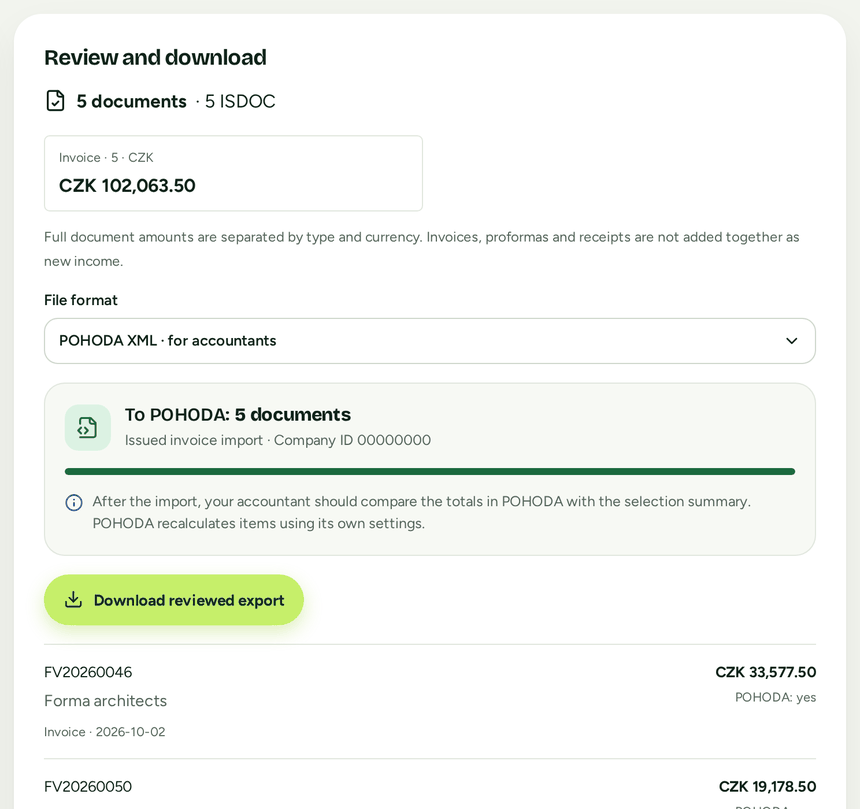
Pick a month or a quarter, review the list of documents and download files your accountant can load into their software.
ISDOC
Invoices in Czech koruna as ISDOC 6.0.2, one by one or in a ZIP.
POHODA XML
Invoices, credit notes and proformas for import into POHODA. Anything that would not transfer exactly is left out, with the reason.
PDF
Originals of issued documents in a ZIP or as one combined PDF.
Excel and CSV
A list of documents with exact amounts, so nothing gets rounded.
POHODA XML is new in the beta. An import into a real POHODA installation has yet to be checked with an accountant.
FAQ
Frequently asked questions.
How do I get into the beta?
The beta is invitation only and registration is switched off. Accounts are created by the administrator. If you have been given access, sign in at beta.fakturio.net.
How much does Fakturio cost?
Fakturio is not a commercial service yet. Nothing is charged in the beta, and the app has no paid features and no limits on documents or contacts.
Is it for VAT payers and non-payers?
Yes. VAT payers issue documents with a tax point date and a VAT summary; for non-payers Fakturio tracks turnover against the registration limit. Some special regimes, such as reverse charge, are not yet supported by every export.
Where is my data?
On a server in the Czech Republic; connections use encrypted HTTPS through Cloudflare’s network. The company owner can download a complete backup at any time. Restoring a backup into Fakturio is not possible yet.
What does not work in the beta yet?
The beta does not send e-mail yet and has no connection to ARES, VIES, ČNB and ECB rates or Fio bank. Recurring invoices and reminders therefore do not run on their own there. The app has these features; they are just not switched on in the beta yet.
Is there an Android app?
There is an Android app, still in a test version. It is not in Google Play. Until it is, use Fakturio in your phone’s browser.
Can I bring data from another invoicing service?
Contacts and your item catalogue can be imported from CSV. Moving issued documents over from other invoicing services is not supported yet.
Private beta
Fakturio is invitation only for now.
We are trying the app out with a small group of people. If you have received an invitation, sign in. There is no registration or sign-up form here, and we collect nothing from you.